生日提醒开发笔记
这是笔者在大一下创新实践课程做的项目,即使还有很多上线刚需的功能没有实装,但是暂时的回顾和复盘是很有必要的。年后两个月左右我会将剩下的功能补齐,到时候再更新文档。
笔者表达能力堪忧,所以请结合源码阅读。
项目需求
在快节奏的现代生活中,我们忙于处理无数事务,重要的日子——比如亲友的生日——常常在指尖悄然溜走。即便记得日期,也可能因一时疏忽而错过那个送上祝福的最佳时刻。这种遗忘不仅留下遗憾,也可能让一份本该温暖的关系悄然降温。
为此,“生日提醒”应运而生。它不止是一个简单的生日记录工具,更是一位贴心的私人提醒助手。您只需提前设置好重要日期,应用便会在预设时间智能发出提醒,为您留出充足的时间准备礼物、构思祝福,或在那一刻准时送上问候。让我们帮助您,把每一个值得纪念的日子,都变成温暖人心的时刻。
核心功能
- 亲友管理:记录亲友基本信息、生日日期、标签分类
- 提醒计划:设置提前N天提醒,支持多种提醒时间
- 自动邮件:生日当天自动发送个性化祝福邮件
- 双模式提醒:
- 提醒用户模式:提前通知用户准备生日祝福
- 自动祝福模式:生日当天自动发送祝福给亲友
技术栈
后端
| 类别 |
技术/组件 |
版本/说明 |
| 核心框架 |
Spring Boot |
3.5.8 |
| Web框架 |
Spring Boot Starter Web |
内置于Spring Boot |
| ORM框架 |
MyBatis |
3.0.3 |
| 分页插件 |
PageHelper |
2.1.0 |
| 邮件服务 |
Spring Boot Starter Mail |
内置于Spring Boot |
| 数据库 |
MySQL |
8.0.31 |
| 开发工具 |
Lombok |
1.18.38 (用于简化POJO) |
|
Spring Boot Devtools |
内置于Spring Boot (热部署) |
| 工具库 |
Hutool |
5.8.38 |
| 系统监控 |
Spring Boot Actuator |
内置于Spring Boot |
| 定时任务 |
基于Spring Boot注解Schedule |
内置于Spring Boot |
前端
| 类别 |
技术/组件 |
说明 |
| UI框架 |
Bootstrap |
5 |
| 图标库 |
Font Awesome |
阿里图标库 |
| 脚本语言 |
JavaScript |
原生 |
项目构建与运行环境
| 类别 |
技术/组件 |
| 构建工具 |
Maven |
| JDK版本 |
JDK 25 |
| 数据库 |
MySQL 8.0+ |
项目架构与结构
1
2
3
4
5
6
7
8
9
10
11
12
13
14
15
16
17
18
19
20
21
22
23
24
25
26
27
28
29
30
31
32
33
34
35
36
37
38
| com.Birthday_reminder
├── Birthday_reminder.java
├── controller/
│ ├── HelloController.java
│ ├── MailTestController.java
│ ├── RelationshipController.java
│ ├── RelationshipRecordController.java
│ └── RelationshipReminderController.java
├── domain/
│ ├── Relationship.java
│ ├── ReminderPlan.java
│ └── ReminderRecord.java
├── dto/
│ ├── PageDTO.java
│ └── RelationshipPageDTO.java
├── mapper/
│ ├── RelationshipMapper.java
│ ├── ReminderPlanMapper.java
│ └── ReminderRecordMapper.java
├── service/
│ ├── RelationPlanService.java
│ ├── RelationshipService.java
│ └── ReminderRecordService.java
├── service/impl/
│ ├── RelationPlanServiceImpl.java
│ ├── RelationshipServiceImpl.java
│ └── ReminderRecordServiceImpl.java
├── task/
│ ├── BirthdayReminderJob.java
│ └── MailJob.java
├── typehandler/
│ └── IntegerListJsonTypeHandler.java
├── util/
│ └── MailUtil.java
└── vo/
├── PageVO.java
├── RelationshipPageVO.java
└── ResponseEntity.java
|
架构说明
这是一个基于 *Spring Boot 的现代化单体应用程序,采用经典的*分层架构。MyBatis 负责数据持久化,配合 PageHelper 处理分页。核心的生日提醒功能通过 Spring Mail 发送邮件。前端使用 Bootstrap 提供响应式界面,整个项目由 Maven 统一构建和管理。
本项目使用的依赖
1
2
3
4
5
6
7
8
9
10
11
12
13
14
15
16
17
18
19
20
21
22
23
24
25
26
27
28
29
30
31
32
33
34
35
36
37
38
39
40
41
42
43
44
45
46
47
48
49
50
51
52
53
54
55
56
57
58
59
60
61
62
63
64
65
66
67
68
69
70
71
72
73
74
75
76
77
78
| <?xml version="1.0" encoding="UTF-8"?>
<project xmlns="http://maven.apache.org/POM/4.0.0"
xmlns:xsi="http://www.w3.org/2001/XMLSchema-instance"
xsi:schemaLocation="http://maven.apache.org/POM/4.0.0 http://maven.apache.org/xsd/maven-4.0.0.xsd">
<modelVersion>4.0.0</modelVersion>
<groupId>org.example</groupId>
<artifactId>Birthday_reminder</artifactId>
<version>1.0-SNAPSHOT</version>
<parent>
<groupId>org.springframework.boot</groupId>
<artifactId>spring-boot-starter-parent</artifactId>
<version>3.5.8</version>
</parent>
<dependencies>
<dependency>
<groupId>org.springframework.boot</groupId>
<artifactId>spring-boot-starter-web</artifactId>
</dependency>
<dependency>
<groupId>org.springframework.boot</groupId>
<artifactId>spring-boot-starter-mail</artifactId>
</dependency>
<dependency>
<groupId>org.mybatis.spring.boot</groupId>
<artifactId>mybatis-spring-boot-starter</artifactId>
<version>3.0.3</version>
</dependency>
<dependency>
<groupId>com.github.pagehelper</groupId>
<artifactId>pagehelper-spring-boot-starter</artifactId>
<version>2.1.0</version>
</dependency>
<dependency>
<groupId>mysql</groupId>
<artifactId>mysql-connector-java</artifactId>
<version>8.0.31</version>
</dependency>
<dependency>
<groupId>org.projectlombok</groupId>
<artifactId>lombok</artifactId>
<version>1.18.38</version>
</dependency>
<dependency>
<groupId>cn.hutool</groupId>
<artifactId>hutool-all</artifactId>
<version>5.8.38</version>
</dependency>
<dependency>
<groupId>org.springframework.boot</groupId>
<artifactId>spring-boot-devtools</artifactId>
<optional>true</optional>
<scope>runtime</scope>
</dependency>
<dependency>
<groupId>org.springframework.boot</groupId>
<artifactId>spring-boot-starter-actuator</artifactId>
</dependency>
</dependencies>
<properties>
<maven.compiler.source>25</maven.compiler.source>
<maven.compiler.target>25</maven.compiler.target>
<project.build.sourceEncoding>UTF-8</project.build.sourceEncoding>
</properties>
</project>
|
表结构设计
我们需要三张表,一张是关系表,名为Relationship,作为主表记录主要信息。
一张是计划表,名为reminder_plan,关联主表记录提醒计划。
一张是记录表,名为reminder_record,关联主表,存储提醒记录,以便管理员查询和修改bug。
创建表结构的SQL如下:
1
2
3
4
5
6
7
8
9
10
11
12
13
14
15
16
17
18
19
20
21
22
23
24
25
26
27
28
29
30
31
32
33
34
35
36
37
38
39
40
41
42
43
44
45
46
47
48
49
50
51
52
53
54
55
56
57
58
59
|
# 亲友关系表
CREATE TABLE `relationship` (
`id` int NOT NULL AUTO_INCREMENT,
`name` varchar(100) NOT NULL,
`my_email` varchar(100) DEFAULT NULL,
`calendar_type` int DEFAULT '0',
`birthday` date DEFAULT NULL,
`birthday_month` int DEFAULT NULL,
`birthday_day` int DEFAULT NULL,
`tag` varchar(50) DEFAULT NULL,
`reminder_enabled` int DEFAULT '0',
`congratulate_enabled` int DEFAULT '0',
`relationship_email` varchar(100) DEFAULT NULL,
`greeting` varchar(200) DEFAULT NULL,
`self_call` varchar(50) DEFAULT NULL,
`notes` text,
`days_before` json DEFAULT NULL,
`created_time` timestamp NULL DEFAULT CURRENT_TIMESTAMP,
`updated_time` timestamp NULL DEFAULT CURRENT_TIMESTAMP ON UPDATE CURRENT_TIMESTAMP,
PRIMARY KEY (`id`)
) ENGINE=InnoDB AUTO_INCREMENT=38 DEFAULT CHARSET=utf8mb4 COLLATE=utf8mb4_0900_ai_ci;
# 提醒计划表
# 该表用于规划后面的发送邮件等任务
CREATE TABLE `reminder_plan` (
`id` int NOT NULL AUTO_INCREMENT COMMENT '计划ID,主键',
`relationship_id` int NOT NULL COMMENT '关联的亲友关系ID',
`reminder_date` date DEFAULT NULL COMMENT '提醒日期',
`days_before` int NOT NULL COMMENT '提前提醒天数',
`reminder_type` int DEFAULT '0' COMMENT '提醒类型 (0:生日提醒, 1:其他提醒)',
`execution_status` int DEFAULT '0' COMMENT '执行状态 (0:待执行, 1:已执行, 2:已取消)',
`created_time` timestamp NULL DEFAULT CURRENT_TIMESTAMP COMMENT '创建时间',
`updated_time` timestamp NULL DEFAULT CURRENT_TIMESTAMP ON UPDATE CURRENT_TIMESTAMP COMMENT '更新时间',
PRIMARY KEY (`id`),
KEY `relationship_id` (`relationship_id`),
CONSTRAINT `reminder_plan_ibfk_1` FOREIGN KEY (`relationship_id`) REFERENCES `relationship` (`id`) ON DELETE CASCADE
) ENGINE=InnoDB AUTO_INCREMENT=32 DEFAULT CHARSET=utf8mb4 COLLATE=utf8mb4_0900_ai_ci COMMENT='提醒计划表';
# 提醒记录表
# 记录,用于保存系统日志供日后查询
CREATE TABLE `reminder_record` (
`id` int NOT NULL AUTO_INCREMENT COMMENT '记录ID,主键',
`relationship_id` int NOT NULL COMMENT '关联的亲友关系ID',
`reminder_time` datetime NOT NULL COMMENT '实际提醒时间',
`receiver` varchar(100) DEFAULT NULL COMMENT '提醒接收方',
`reminder_type` int DEFAULT NULL COMMENT '提醒类型',
`reminder_content` text COMMENT '提醒内容',
`send_status` int DEFAULT '0' COMMENT '发送状态 (0:成功, 1:失败)',
`created_time` timestamp NULL DEFAULT CURRENT_TIMESTAMP COMMENT '创建时间',
PRIMARY KEY (`id`),
KEY `relationship_id` (`relationship_id`),
CONSTRAINT `reminder_record_ibfk_1` FOREIGN KEY (`relationship_id`) REFERENCES `relationship` (`id`) ON DELETE CASCADE
) ENGINE=InnoDB AUTO_INCREMENT=3 DEFAULT CHARSET=utf8mb4 COLLATE=utf8mb4_0900_ai_ci COMMENT='提醒记录表';
|
值得一提的是,我在创建时间和修改时间使用的语句是
1
2
| `created_time` timestamp NULL DEFAULT CURRENT_TIMESTAMP COMMENT '创建时间',
`updated_time` timestamp NULL DEFAULT CURRENT_TIMESTAMP ON UPDATE CURRENT_TIMESTAMP COMMENT '更新时间',
|
使用了MySQL的原生功能—-自动填充变动时间戳,这意味着我们不再需要在项目中额外用代码配置。
跨域
这是在开发过程中一个比较重要的知识点。
跨域是浏览器的一种安全限制,它阻止你网页上的JavaScript代码,去请求另一个“来源”(域名、端口、协议不同)的服务器的数据。
也就是****默认情况下,只允许网页与“同源”的服务器自由通信。
同源指的是协议端口域名都必须相同,一旦出现以下任意一种情况,浏览器就会自动拦截操作
- 协议不同:
http://example.com 请求 https://example.com
- 域名不同:
http://a.com 请求 http://b.com
- 端口不同:
http://localhost:3000 请求 http://localhost:8080
作为一个简单的演示级项目,我们将前端三件套的文件(html,css,js)等与后端文件放在一起,实现逻辑上的分离但结构上的耦合。
使用MyBatisX插件快速生成实体类
MyBatisX插件是一个强大的IDEA插件,能够提供跳转、代码生成、提示等功能,优化基于MyBatis/MyBatis-Plus的开发体验。我们可以用它生成实体类甚至是Service层。
在Idea中配置数据库之后就能够用MybatisX插件生成实体类,具体教程请自行搜索。
请原谅,我不可能在这里用大量图片篇幅来解释这个过程。
项目结构层级作用
想半天也不知道怎么写,将就看吧。
有些层和其他层耦合严重,介绍层级就按照拓扑排序顺序来,先讲简单的。
项目一共有几个层级,分别是:
- Controller控制器层:与前端直接交互,完成交互逻辑
- Domain实体层:将数据库格式转化为java对象
- DTO层:数据运输对象,封装某些参数在网络中传输,不带逻辑处理,作用是减少网络中传输次数。
- Mapper数据访问层:Java的数据库接口,声明了数据库操作方法
- Service服务层接口:针对三个界面写的三个接口,在Impl层用类实现并填充
- Task层:基于@Schedule实现,负责执行定时任务。
- TypeHandler层:数据转换器层将json类型转化为java对象,这个后面会提一嘴。
- Util层:工具类,发送邮件
- VO层:视图对象,为了美观地展示数据,我们需要将返回的数据封装成一个识图对象,才能与前端联动展示
所以,整体执行逻辑应该是:
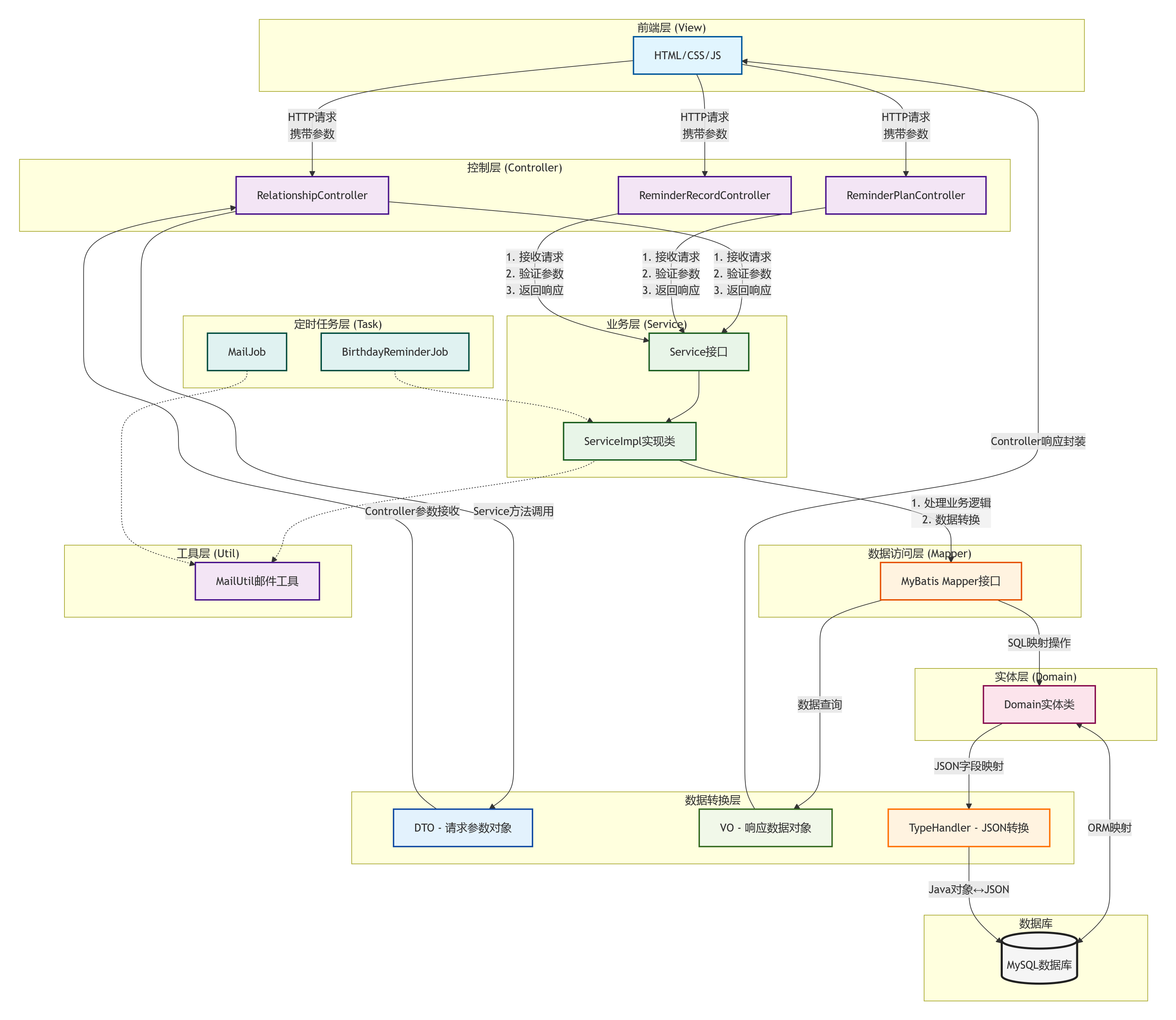
DTO层
我们用了PageHelper插件来实现分页展示那参数就是页码page和每页要展示的数量size.
1
2
3
4
5
6
| public class PageDTO implements Serializable {
private Integer page;
private Integer size;
}
|
那就集成序列化类,写一个简单的类就行了。
Domain层
这里有什么好写的?
使用MyBatisX插件生成的,你自己写的话注意和数据库的数据类型和顺序要完全对得上。
插件为了保证稳妥,甚至自动生成了操作方法,虽然这样的写法可读性不可理喻。
1
2
3
4
5
6
7
8
9
10
11
12
13
14
15
16
17
18
19
20
21
22
23
24
25
26
27
| public boolean equals(Object that) {
if (this == that) {
return true;
}
if (that == null) {
return false;
}
if (getClass() != that.getClass()) {
return false;
}
Relationship other = (Relationship) that;
return (this.getId() == null ? other.getId() == null : this.getId().equals(other.getId()))
&& (this.getName() == null ? other.getName() == null : this.getName().equals(other.getName()))
&& (this.getCalendarType() == null ? other.getCalendarType() == null : this.getCalendarType().equals(other.getCalendarType()))
&& (this.getBirthday() == null ? other.getBirthday() == null : this.getBirthday().equals(other.getBirthday()))
&& (this.getBirthdayMonth() == null ? other.getBirthdayMonth() == null : this.getBirthdayMonth().equals(other.getBirthdayMonth()))
&& (this.getBirthdayDay() == null ? other.getBirthdayDay() == null : this.getBirthdayDay().equals(other.getBirthdayDay()))
&& (this.getTag() == null ? other.getTag() == null : this.getTag().equals(other.getTag()))
&& (this.getRemindEnabled() == null ? other.getRemindEnabled() == null : this.getRemindEnabled().equals(other.getRemindEnabled()))
&& (this.getCongratulateEnabled() == null ? other.getCongratulateEnabled() == null : this.getCongratulateEnabled().equals(other.getCongratulateEnabled()))
&& (this.getRelationshipEmail() == null ? other.getRelationshipEmail() == null : this.getRelationshipEmail().equals(other.getRelationshipEmail()))
&& (this.getGreeting() == null ? other.getGreeting() == null : this.getGreeting().equals(other.getGreeting()))
&& (this.getSelfCall() == null ? other.getSelfCall() == null : this.getSelfCall().equals(other.getSelfCall()))
&& (this.getNotes() == null ? other.getNotes() == null : this.getNotes().equals(other.getNotes()))
&& (this.getDaysBefore() == null ? other.getDaysBefore() == null : this.getDaysBefore().equals(other.getDaysBefore()));
}
|
Util层
一个工具类,没什么好说的,调用函数,传入该传的原子参数就行。
Mapper层
这一层就是声明数据库查询方法,具体实现看源码。
TypeHandler层
明确,在前端,提前天数是可选的:
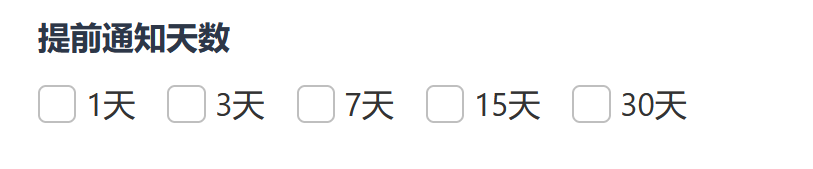
数据库中提前天数我使用的是
1
| `days_before` json DEFAULT NULL,
|
这是一个非空的json数据类型,比较的“生僻”,所以使用MyBatisX插件的时候,他将数据库的提前天数给我生成了object类,这是java的一个很底层的基类,直接使用它可能会出现类型安全问题,代码可读性差,Lombok生成意外方法等问题,所以最好将他转化为java更常用的数据类型,我们单独写了TypeHandler来解决这个问题。
1
2
3
4
5
6
7
8
9
10
11
12
13
14
15
16
17
| import cn.hutool.json.JSONUtil;
import org.apache.ibatis.type.BaseTypeHandler;
import org.apache.ibatis.type.JdbcType;
import java.sql.CallableStatement;
import java.sql.PreparedStatement;
import java.sql.ResultSet;
import java.sql.SQLException;
import java.util.List;
public class IntegerListJsonTypeHandler extends BaseTypeHandler<List<Integer>> {
@Override
public void setNonNullParameter(PreparedStatement ps, int i, List<Integer> parameter, JdbcType jdbcType) throws SQLException {
String json =JSONUtil.toJsonStr(parameter);
ps.setString(i,json);
}
|
也是使用了Java内置和hutools工具箱去转换,具体请移步到项目源码。
Service层
这里才是真正的业务大脑,在这里需要做到
- 一个接口,一个实现
- 处理复杂的业务规则
- 协调多个Mapper完成一个功能
Relationship接口
增删改查:
1
2
3
4
5
6
7
8
9
10
11
12
13
14
15
16
17
18
19
20
21
22
23
24
25
26
27
28
29
30
31
32
33
| public Relationship getRelationship(Integer id) {
if (id == null || id <= 0) {
throw new RuntimeException("无效的ID");
}
Relationship relationship = relationshipMapper.selectById(id);
if (relationship == null) {
throw new RuntimeException("未找到对应的亲友关系");
}
return relationship;
}
@Override
public Relationship createRelationship(Relationship relationship) {
int result = relationshipMapper.insert(relationship);
return relationship;
}
@Override
public Boolean updateRelationship(Relationship relationship) {
Relationship existing = relationshipMapper.selectById(relationship.getId());
if (existing == null) {
return false;
}
int result = relationshipMapper.update(relationship);
return result > 0;
}
@Override
public Boolean deleteRelationship(Integer id) {
int result = relationshipMapper.delete(id);
return result > 0;
}
}
|
分页效果:
1
2
3
4
5
6
7
8
9
10
11
12
13
14
15
16
17
18
19
20
21
22
23
24
25
26
27
28
29
30
31
32
33
34
35
36
37
38
39
40
41
42
43
44
45
|
public PageInfo<RelationshipPageVO> queryRelationshipPage(RelationshipPageDTO dto) {
PageHelper.startPage(dto.getPage(), dto.getSize());
List<Relationship> relationships = relationshipMapper.selectAll(dto);
PageInfo<Relationship> pageInfo = new PageInfo<>(relationships);
List<RelationshipPageVO> vos = pageInfo.getList().stream().map(relationship -> {
RelationshipPageVO vo = new RelationshipPageVO();
BeanUtils.copyProperties(relationship, vo);
return vo;
}).collect(Collectors.toList());
PageInfo<RelationshipPageVO> result = new PageInfo<>(vos);
result.setTotal(pageInfo.getTotal());
result.setPages(pageInfo.getPages());
result.setPageNum(pageInfo.getPageNum());
result.setPageSize(pageInfo.getPageSize());
result.setSize(pageInfo.getSize());
result.setStartRow(pageInfo.getStartRow());
result.setEndRow(pageInfo.getEndRow());
result.setPrePage(pageInfo.getPrePage());
result.setNextPage(pageInfo.getNextPage());
result.setIsFirstPage(pageInfo.isIsFirstPage());
result.setIsLastPage(pageInfo.isIsLastPage());
result.setHasPreviousPage(pageInfo.isHasPreviousPage());
result.setHasNextPage(pageInfo.isHasNextPage());
result.setNavigatePages(pageInfo.getNavigatePages());
result.setNavigatepageNums(pageInfo.getNavigatepageNums());
result.setNavigateFirstPage(pageInfo.getNavigateFirstPage());
result.setNavigateLastPage(pageInfo.getNavigateLastPage());
return result;
}
|
我觉得注释已经够详细了。
RelationRecord接口
1
2
3
4
5
6
7
8
9
10
11
12
13
14
15
16
17
18
19
20
21
22
23
24
25
26
27
28
| public class ReminderRecordServiceImpl implements ReminderRecordService {
@Autowired
private ReminderRecordMapper mapper;
@Override
public PageInfo<ReminderRecord> getPageList(Integer page, Integer size, Integer relationshipId) {
PageHelper.startPage(page, size);
List<ReminderRecord> list = mapper.selectAll(relationshipId);
return new PageInfo<>(list);
}
@Override
public ReminderRecord getById(Integer id) {
return mapper.selectById(id);
}
@Override
public void markAsProcessed(Integer id) {
}
@Override
public List<ReminderRecord> getPendingRecords()
{
return mapper.selectPendingRecords();
}
}
|
RelationPlan接口
该接口需要进行复杂的任务,请保持耐心
Plan方法
为指定的亲友关系创建提醒计划。
话说为什么答辩的时候脑子突然宕机了呢
1
2
3
4
5
6
7
8
9
10
11
12
13
14
15
16
17
18
19
20
21
22
23
24
25
26
27
28
29
30
31
32
33
34
35
36
37
38
39
40
41
42
43
44
45
46
47
48
49
50
51
52
53
54
55
56
57
58
59
60
61
62
63
64
65
66
67
68
69
70
71
|
public void plan(Relationship relationship) {
if (Objects.isNull(relationship)){
return;
}
mapper.deleteByRelationshipId(relationship.getId());
validateParams(relationship);
LocalDate birthday = calculateBirthday(relationship);
LocalDate now = LocalDate.now();
List<ReminderPlan> plans = new ArrayList<>();
if (relationship.getRemindEnabled() != null && relationship.getRemindEnabled() == 1) {
List<Integer> daysBefore = relationship.getDaysBefore();
if (CollectionUtil.isNotEmpty(daysBefore)) {
for (Integer bf : daysBefore) {
LocalDate reminderDate = birthday.minusDays(bf);
if (now.isAfter(reminderDate)) {
continue;
}
ReminderPlan plan = buildBasicPlan(relationship);
plan.setReminderType(0);
plan.setReminderDate(reminderDate);
plan.setDaysBefore(bf);
plans.add(plan);
}
}
}
if (relationship.getCongratulateEnabled() != null && relationship.getCongratulateEnabled() == 1) {
if (StrUtil.isBlank(relationship.getRelationshipEmail())) {
log.warn("亲友 {} 启用了祝贺功能但没有设置邮箱,跳过祝贺计划", relationship.getName());
} else {
if (!now.isAfter(birthday)) {
ReminderPlan congratulatePlan = buildBasicPlan(relationship);
congratulatePlan.setReminderType(1);
congratulatePlan.setReminderDate(birthday);
congratulatePlan.setDaysBefore(0);
plans.add(congratulatePlan);
}
}
}
if (CollectionUtil.isNotEmpty(plans)) {
mapper.saveBatch(plans);
log.info("为亲友 {} 创建了 {} 条计划", relationship.getName(), plans.size());
}
}
|
executePlan方法
1
2
3
4
5
6
7
8
9
10
11
12
13
14
15
16
17
18
19
20
21
22
23
24
25
26
27
28
29
30
31
32
33
34
35
36
37
38
39
40
41
42
43
44
45
46
47
48
49
50
51
52
53
54
55
56
57
58
59
60
61
62
63
64
65
|
@Override
@Transactional
public void executePlan(LocalDate now) {
List<ReminderPlan> plans = mapper.listUndoPlans(now);
if (CollUtil.isEmpty(plans)) {
log.info("当前没有执行计划");
return;
}
log.info("找到 {} 条待执行的提醒计划", plans.size());
for (ReminderPlan plan : plans) {
try {
log.info("开始执行计划:{}", plan);
Relationship relationship = relationshipMapper.selectById(plan.getRelationshipId());
if (relationship == null) {
log.warn("计划ID {} 关联的亲友信息不存在,跳过", plan.getId());
continue;
}
if (StrUtil.isBlank(relationship.getMyEmail())) {
log.warn("计划ID {} 关联的亲友 {} 没有邮箱,跳过", plan.getId(), relationship.getName());
continue;
}
ReminderRecord record = new ReminderRecord();
record.setRelationshipId(plan.getRelationshipId());
record.setReminderTime(LocalDateTime.now());
record.setReminderType(plan.getReminderType());
if (plan.getReminderType() == 0) {
record.setReceiver(relationship.getMyEmail());
} else if (plan.getReminderType() == 1) {
record.setReceiver(relationship.getRelationshipEmail());
}
reminderRecordMapper.insert(record);
log.info("已创建提醒记录:亲友 {}, 接收者 {}", relationship.getName(), relationship.getMyEmail());
plan.setExecutionStatus(1);
mapper.update(plan);
log.info("计划ID {} 执行完成", plan.getId());
} catch (Exception e) {
log.error("执行计划ID {} 失败: {}", plan.getId(), e.getMessage(), e);
}
}
log.info("提醒计划执行完毕,共处理 {} 条计划", plans.size());
}
|
剩下几个比较基础的增删改查就不赘述了。
Task层
1
2
3
4
5
6
7
8
9
10
11
12
13
14
| public class BirthdayReminderJob {
@Autowired
private RelationPlanService planService;
@Scheduled(cron = "0 0 9,12,20 * * ?")
@Transactional
public void reminder() {
planService.executePlan(LocalDate.now());
}
}
|
cron表达式使用如下:
1
2
3
4
5
6
7
8
| ┌───────────── 秒(0-59)
│ ┌─────────── 分钟(0-59)
│ │ ┌───────── 小时(0-23)
│ │ │ ┌─────── 日(1-31)
│ │ │ │ ┌───── 月(1-12 或 JAN-DEC)
│ │ │ │ │ ┌─── 周几(0-7 或 SUN-SAT,0和7均代表周日)
│ │ │ │ │ │
* * * * * ? *(可选年字段,1970-2099)
|
VO层
和前端连起来需要格式化输出和一个响应体类,VO层就是解决这个问题。
PageVO和RelationshipVO几乎是Domain层的复刻,但是我想说的是ResponseEntity。
后端需要响应到前端,就需要一个响应体,体内应该有状态码等信息,还需要封装基本的方法。
使用泛型T是因为响应体通用,处理的对象类型不应受限制。
1
2
3
4
5
6
7
8
9
10
11
12
13
14
15
16
17
18
19
20
21
22
23
24
25
26
27
28
29
30
31
32
33
34
35
36
37
38
39
40
41
42
43
44
45
46
47
48
49
50
| public class ResponseEntity<T> implements Serializable {
private Boolean success;
private String message;
private String code;
private T data;
public static <T> ResponseEntity<T> success(T data){
ResponseEntity<T> response=new ResponseEntity<T>();
response.success=true;
response.data=data;
response.code="200";
return response;
}
public static <T> ResponseEntity<T> success(){
return success(null);
}
public static <T> ResponseEntity<T> fail(T data,String message){
ResponseEntity<T> response=new ResponseEntity<T>();
response.success=false;
response.data=data;
response.code="500";
response.message=message;
return response;
}
public static <T> ResponseEntity<T> fail(){
return fail(null);
}
public static <T> ResponseEntity<T> fail(String message){
return fail(null,message);
}
}
|
Controller层
Relationship控制器
该控制器和其他层耦合严重,请配合源码阅读。
1
2
3
4
5
6
7
8
9
10
11
12
13
14
15
16
17
18
19
20
21
22
23
24
25
26
27
28
29
30
31
32
33
34
35
36
37
38
39
40
41
42
43
44
45
46
47
48
49
50
51
52
53
54
55
56
57
58
59
60
61
62
63
64
65
66
67
68
69
70
71
72
73
74
75
76
77
78
79
80
81
82
83
84
85
|
@RestController
@RequestMapping("/api/relationship")
public class RelationshipController {
@Autowired
private RelationPlanService relationPlanService;
@Resource
private RelationshipService relationshipService;
@GetMapping("/page")
public ResponseEntity<PageVO<RelationshipPageVO>> page(RelationshipPageDTO dto){
if (dto.getPage() == null || dto.getPage() <= 0) {
dto.setPage(1);
}
if (dto.getSize() == null || dto.getSize() <= 0) {
dto.setSize(10);
}
PageInfo<RelationshipPageVO> pageInfo = relationshipService.queryRelationshipPage(dto);
PageVO<RelationshipPageVO> pageVO = new PageVO<>(
pageInfo.getList(),
pageInfo.getPages(),
pageInfo.getPageNum(),
pageInfo.getPageSize(),
pageInfo.getTotal()
);
return ResponseEntity.success(pageVO);
}
@GetMapping("/{id}")
public ResponseEntity<Relationship> get(@PathVariable Integer id) {
return ResponseEntity.success(relationshipService.getRelationship(id));
}
@PostMapping
@Transactional
public ResponseEntity<Integer> create(@RequestBody Relationship relationship) {
try {
Relationship relation = relationshipService.createRelationship(relationship);
relationPlanService.plan(relation);
return ResponseEntity.success(relation.getId());
} catch (Exception e) {
e.printStackTrace();
return ResponseEntity.fail("创建亲友关系失败: " + e.getMessage());
}
}
@PutMapping
@Transactional
public ResponseEntity<Boolean> update(@RequestBody Relationship relationship) {
Boolean b = relationshipService.updateRelationship(relationship);
relationPlanService.plan(relationship);
return ResponseEntity.success(b);
}
@DeleteMapping("/{id}")
@Transactional
public ResponseEntity<Boolean> delete(@PathVariable Integer id) {
Boolean b = relationshipService.deleteRelationship(id);
relationPlanService.deleteByRelationshipId(id);
return ResponseEntity.success(b);
}
}
|
RelationshipReminder控制器
1
2
3
4
5
6
7
8
9
10
11
12
13
14
15
16
17
18
19
20
21
22
23
24
25
26
27
28
29
30
31
32
33
34
35
36
37
38
39
40
41
42
43
44
45
46
47
48
49
50
51
52
53
54
55
56
57
58
59
| @GetMapping
public ResponseEntity<PageVO<ReminderPlan>> getList(
@RequestParam(defaultValue = "0") Integer page,
@RequestParam(defaultValue = "10") Integer size,
@RequestParam(required = false) Integer relationshipId) {
PageInfo<ReminderPlan> pageInfo = relationPlanService.getPageList(page + 1, size, relationshipId);
PageVO<ReminderPlan> pageVO = new PageVO<>(
pageInfo.getList(),
pageInfo.getPages(),
pageInfo.getPageNum(),
pageInfo.getPageSize(),
pageInfo.getTotal()
);
return ResponseEntity.success(pageVO);
}
@GetMapping("/{id}")
public ResponseEntity<ReminderPlan> getById(@PathVariable Integer id) {
ReminderPlan plan = relationPlanService.getById(id);
return ResponseEntity.success(plan);
}
@PostMapping
public ResponseEntity<ReminderPlan> create(@RequestBody ReminderPlan reminderPlan) {
try {
relationPlanService.create(reminderPlan);
return ResponseEntity.success(reminderPlan);
} catch (Exception e) {
e.printStackTrace();
return ResponseEntity.fail("创建提醒计划失败: " + e.getMessage());
}
}
@PutMapping("/{id}")
public ResponseEntity<Void> update(@PathVariable Integer id, @RequestBody ReminderPlan reminderPlan) {
reminderPlan.setId(id);
relationPlanService.update(reminderPlan);
return ResponseEntity.success();
}
@DeleteMapping("/{id}")
public ResponseEntity<Void> delete(@PathVariable Integer id) {
relationPlanService.deleteById(id);
return ResponseEntity.success();
}
}
|
Yaml配置
1
2
3
4
5
6
7
8
9
10
11
12
13
14
15
16
17
18
19
20
21
22
23
24
25
26
27
28
29
30
31
32
33
34
35
36
37
38
| server:
port: 8080
spring:
application:
name: Birthday_reminder
datasource:
url: jdbc:mysql://127.0.0.1:3306/table_Birthday?useUnicode=true&characterEncoding=utf-8&useSSL=false&allowPublicKeyRetrieval=true
username: root
password: root
driver-class-name: com.mysql.cj.jdbc.Driver
mail:
host: smtp.qq.com
port: 587
username: example@qq.com
password: xxxxxxxxxxxxxx
properties:
mail:
smtp:
auth: true
starttls:
enable: true
devtools:
restart:
enabled: true
additional-paths:
- src/main/java
- src/main/resources
mybatis:
mapper-locations: classpath:mapper/*.xml
type-aliases-package: com.Birthday_reminder.domain
logging:
level:
com.Birthday_reminder: DEBUG
org.springframework.jdbc: DEBUG
org.springframework.boot.autoconfigure.jdbc: DEBUG
|
源码地址
见Github仓库,如果有问题可以通过邮箱与我交流。